API keys login
To configure the Valsight application to use the API keys login method, edit conf/config.yml and restart the server after making changes.
This login method is not a SSO method, but an alternative to standard username/password login. It is possible to login with API keys, even if the form login was disabled. API keys are stored as a hash in the database.
| Configuration key (apiKeyAuth →) | Description | Example value | Default value |
|---|---|---|---|
enabled | Whether the API keys authentication method is allowed or not. | true | false |
How to generate and remove API keys
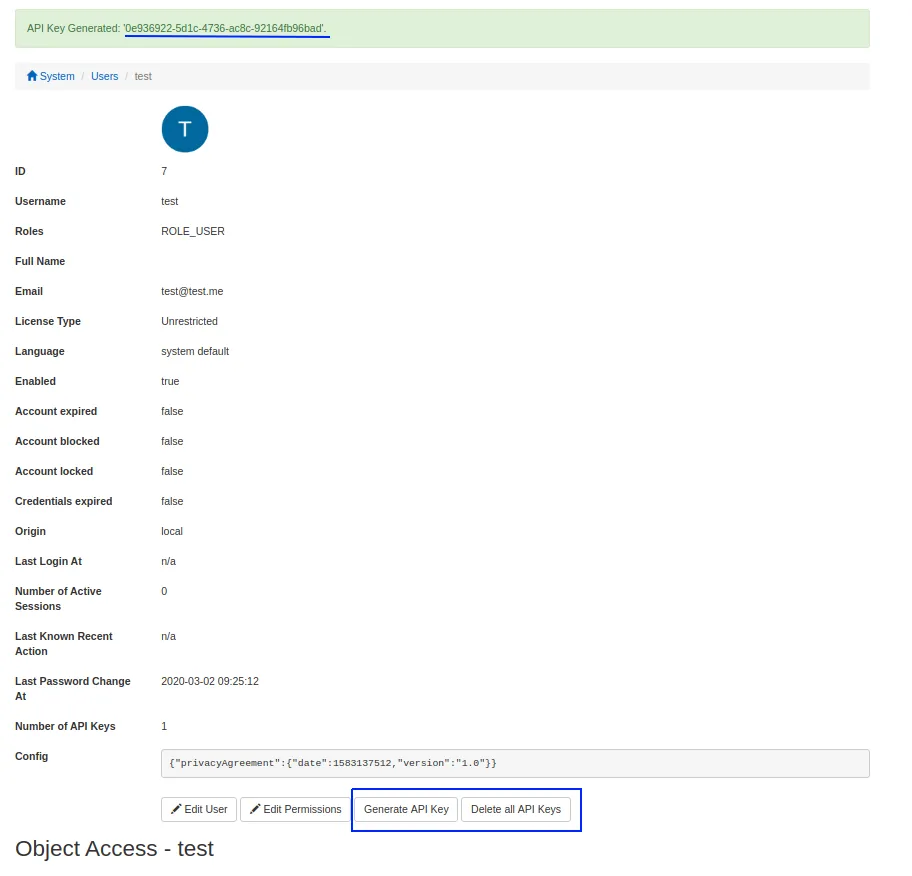
Option 1: from your user profile
Available since 4.7.0.
To generate an API key
- Navigate to your profile via the navigation bar
- Click on the button ‘Generate API Key’
- The generated key is shown
The leading and trailing are not part of the key. This is the only time and place where you can see the generated key. If you leave or reload the page with the displayed key, you will not be able to view it in the application again.
How to remove an API key
- Navigate to your profile via the navigation bar
- Click on the button ‘Delete all API keys’
- All the API keys for your user are removed
It is not possible to remove only one specific key for a user.
Option 2: from the Valsight settings
To generate an API key
- In the Valsight settings navigate to the user profile
- Click on the button ‘Generate API key’
- The generated key appears at the top
The leading and trailing are not part of the key. This is the only time and place where you can see the generated key. If you leave or reload the page with the displayed key, you will not be able to view it in the application again.
How to remove an API key
- In the Valsight settings navigate to the user profile
- Click on the button ‘Delete all API keys’
- All the API keys for that user are removed
It is not possible to remove only one specific key for a user.
How to log in with API keys
- Make sure this login method is turned on in the config.yml
- Use a valid API key
- Create a form POST request to the endpoint ‘
/v1/apiKey’. The form contains 2 parameter, ‘username’ and ‘api_key’. - If the combination username/key was valid the application will recognize the user from it and log him in. The response contains a cookie ‘JSESSIONID’ that the user can use to authenticate for subsequent requests. The cookie is present in the HTTP header ‘Set-Cookie’ in the response.
You can see if the user logged in via API key or form in the ‘Security audit log’. The login successful entry will have ‘API key login’ attached to it, if the user logged in via an API key.
Logging
For logging purposes, add the following package in the log level view of the Configuration UI:
- Logger: com.valsight.authentication.apikey.ApiKeyAuthenticationProvider
- Level: DEBUG