Part 3: Upload Data
In this part, you upload the sample Excel file and validate that it matches the project dimensions.
Data in Valsight provides the input values that feed models and serve as the baseline for calculations, simulations, and analysis.
For detailed reference on any of the concepts here, see Data Import & Export.
Watch the video guide
Sample file
Use one Excel file with one worksheet named Price and Volume.
Required columns
| Column | Type | Notes |
|---|---|---|
Year | Dimension level | System default time level. Must be named Year |
Product | Dimension level | Must match the Product level name exactly |
Country | Dimension level | Must match the Country level name exactly |
Price | Measure | Used later in model calculations |
Volume | Measure | Used later in model calculations |
Example data
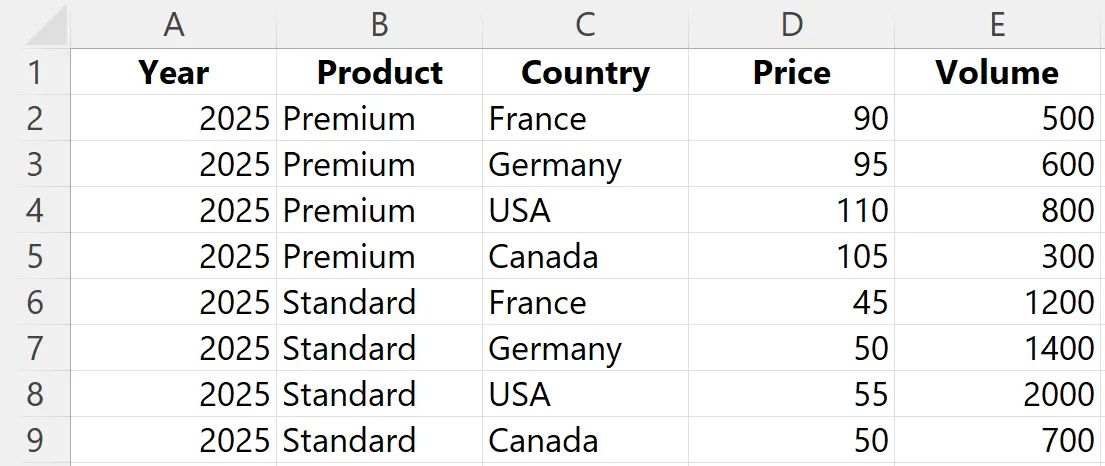
Before you upload, make sure:
- Data starts in the first row
- Cells are not empty
- No sheet name or column header starts with
#, or it is skipped on import - The worksheet contains only the upload data
Steps
Upload the data source
- Open Data Sources.
- Click the green New Datasource dropdown and pick XLSX.
- Choose your sample file. The Data Source Type is already set and shown read-only, so there is no file type to select in the form.
- Enter
TutorialDataas the name for the data source. - Click Create Data Source.
Validate dimensions
After upload, Valsight checks whether the values in your file match the dimensions in the project.
- Click Validate dimensions.
- Check the Errors tab for any validation messages.
- If level values are missing, click on the Dimension Management tab and add them.
- Return to the validation result and verify that there are no errors.
Important To add missing level values during upload, all levels must be present in the data source. For example, to fill missing values forCountry, the correspondingRegionvalues must also exist in the upload.
Result
- Uploaded the sample file as
TutorialData - Validated that the file matches the project dimensions