Tutorial: Build a Valsight Project
This tutorial shows how to build a complete Valsight project from scratch: you will create a project, set up dimensions, upload data, build a driver model, simulate scenarios, and analyze the results.
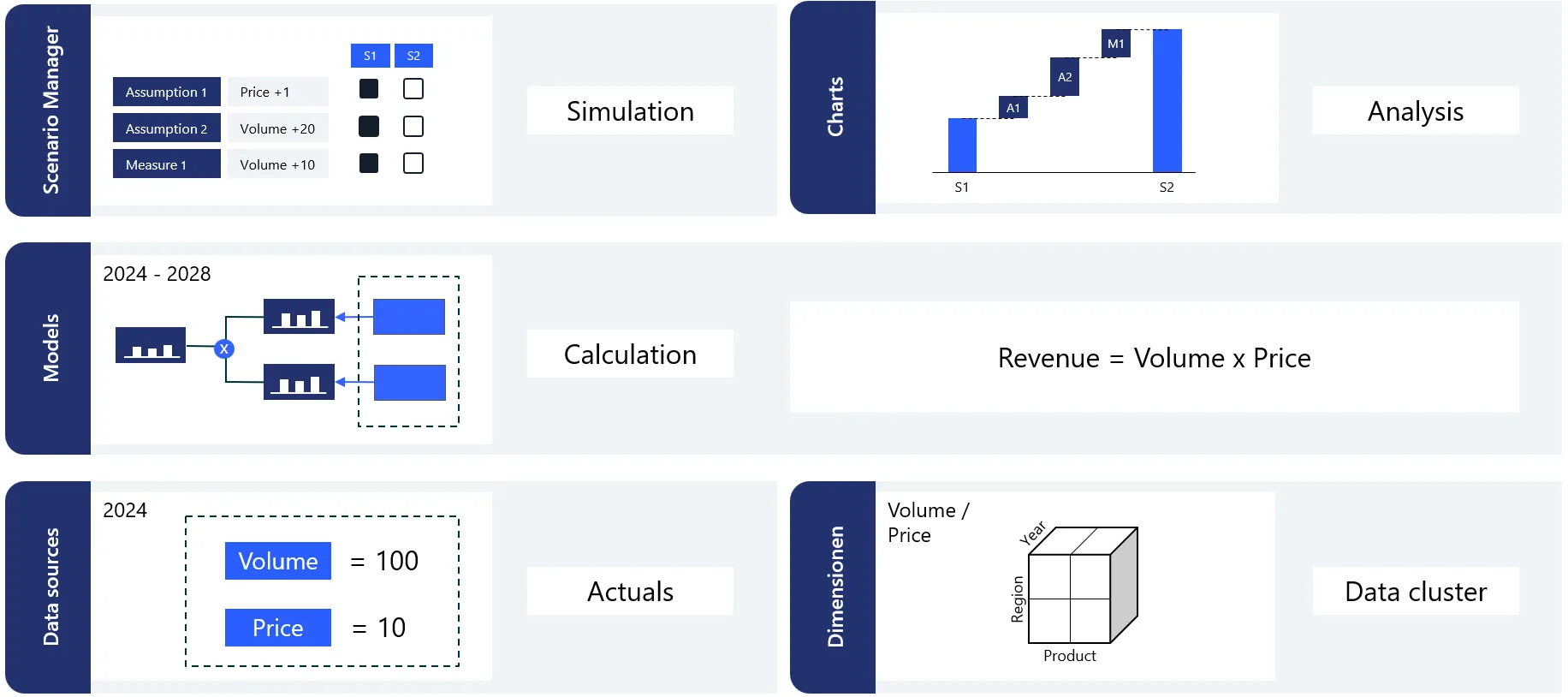
What you will build: A complete project, with dimensions and data sources feeding a driver model (Revenue = Volume x Price), a simulation scenario in the Scenario Manager, and charts to analyze the results.
Before you begin
- You need a Valsight account with permission to create projects. See Access Rights if you are not sure what your role allows.
- Budget around 45–60 minutes to complete all six parts.
- No sample file is provided; you will enter the example data shown in each part yourself.
Tutorial structure
This tutorial is split into six parts. Each part builds on the previous one.
Create a project and set its time horizon.Part 1: Create a Project →Create product and location dimensions.Part 2: Set Up Dimensions →Upload and validate your data.Part 3: Upload Data →Build the calculation logic.Part 4: Build the Driver Model →Set up and activate a simulation scenario.Part 5: Simulate →Visualize results with charts and tables.Part 6: Analyze Results →